
FEATURES · LIVE PARAMETERS · NEW IN 2.7
Tune your controller without reflashing.
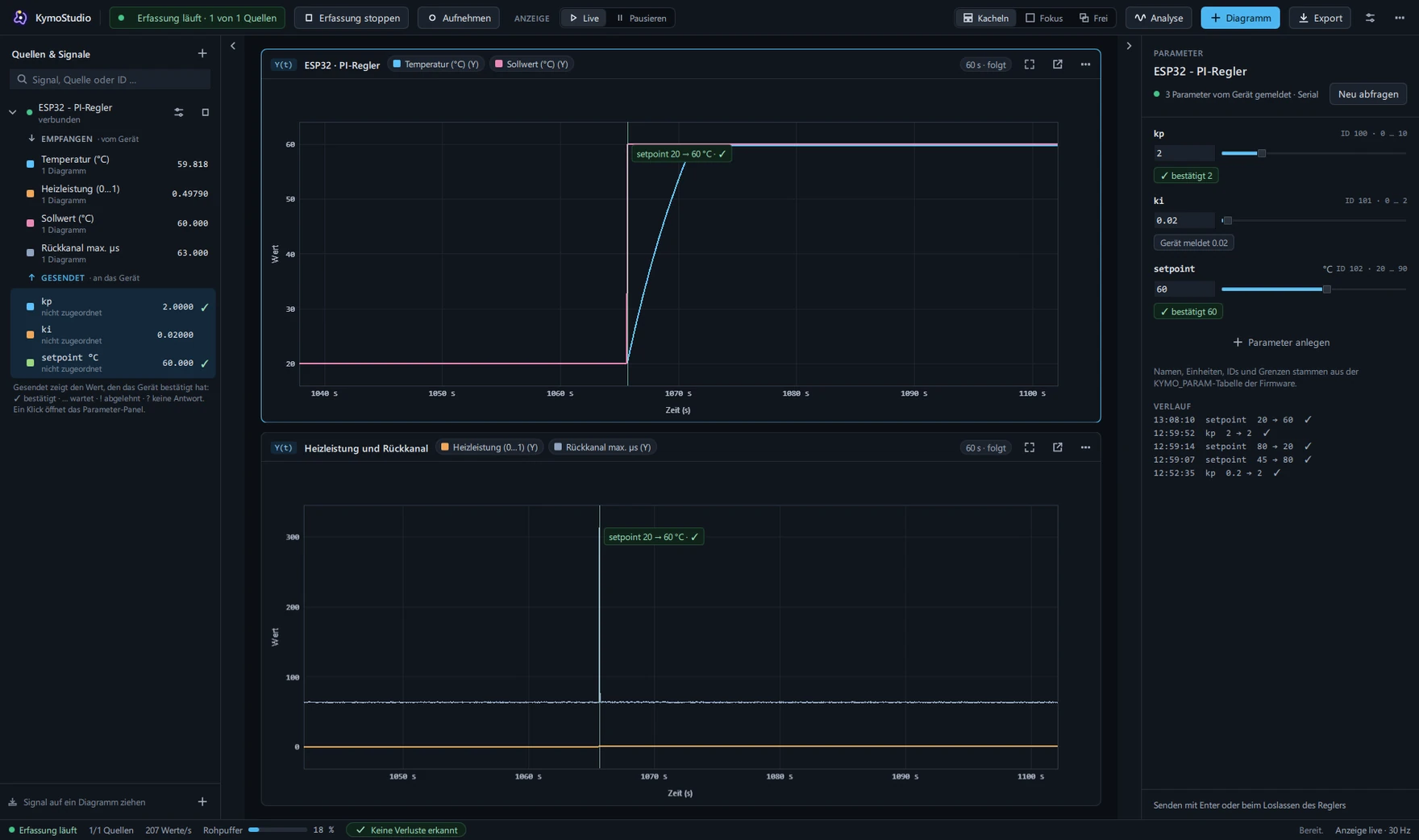
Change kp, setpoints or limits in KymoStudio while your device runs. The device confirms every value, and you see at once how the curve reacts.
The problem
Tuning a controller usually means: change the value in code, compile, flash, wait, watch – twenty times. Every round costs minutes and breaks the link between a change and its effect.
What Kymotrace does
The firmware reports its tunable variables with limits and unit. KymoStudio shows them in a panel next to the source, sends new values back and evaluates the device's answer.
How it works
- 1The firmware reports its parametersOne line per variable with limits. KymoStudio asks for the list when the source connects.
- 2You set the valueField or slider in the parameter panel. Values outside the limits are never sent.
- 3The device confirmsConfirmed, rejected or no answer – never silent. A marker in the chart shows the moment.
In the firmware
With KymoCore 7.1: list the variables, pass on the received bytes, done. The back channel has its own switch; without it, it is not in the code at all, and KymoStudio's receive path stays unchanged.
static float kp = 0.2f, setpoint = 45.0f;

static const KymoParameter params[] = {
    KYMO_PARAM(100, kp,       0.0f, 10.0f, ""),
    KYMO_PARAM(102, setpoint, 20.0f, 90.0f, "\xC2\xB0" "C"),
};
static KymoParamReceiver receiver;

// setup()
KymoParam_Init(&receiver, params, KYMO_COUNT_OF(params));
// loop(): pass on the received bytes
KymoParam_Feed(&receiver, rx, n);
Key points
- Over serial, TCP, UDP and MQTT; CAN with parameters created by hand
- The firmware checks every value itself and has the last word
- Answers are normal signals: record, export, compare
- Through MCP for Claude Code and Codex too: set a value and wait for the confirmation
Honest limits
- Single numbers (float); several axes together are set by the firmware itself
- No automatic parameter list over classic CAN
- UDP only after the device sent its first datagram; MQTT needs a send topic
- Needs KymoCore 7.1 in the firmware