Many sources at once
Serial, TCP, UDP, MQTT, CAN and a test generator. Each source starts and stops on its own and reconnects after a dropout.
 KYMOTRACE
FEATURES · MEASUREMENT & ANALYSIS
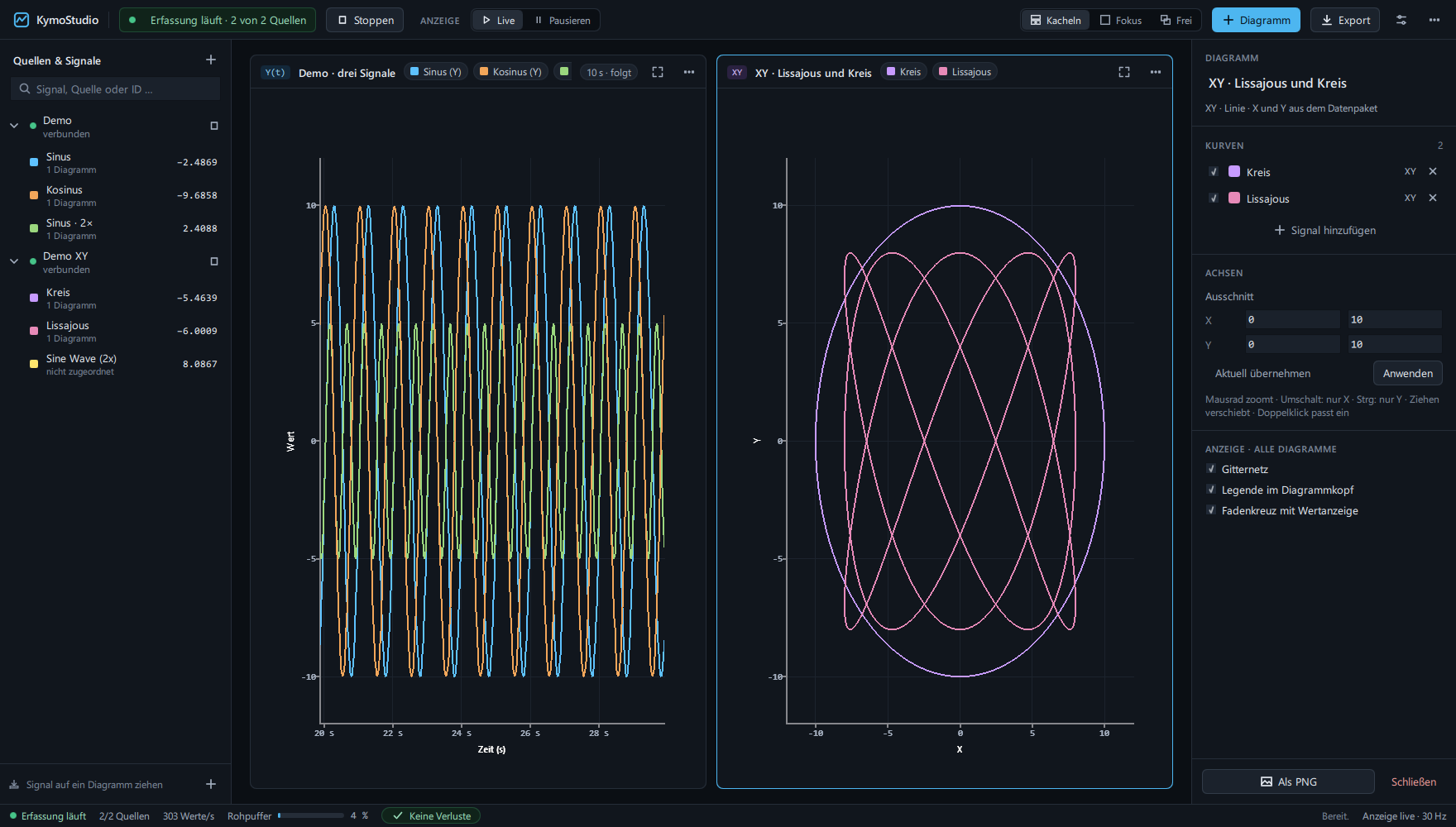
Several sources at once, six chart types and an analysis that works on the stored raw values – while acquisition keeps running.
A serial monitor shows numbers scrolling past. A plotter shows a curve, but no numbers you can trust: was a value lost, is this the real sample or the decimated display, when exactly did it happen?
Every value keeps its time basis – device time, a known sample rate or reception time. Losses, CRC errors and overload are counted per source. Measurements are computed from raw data, never from what the screen happens to draw.
Serial, TCP, UDP, MQTT, CAN and a test generator. Each source starts and stops on its own and reconnects after a dropout.
Kymotrace binary, Teleplot, name=value, CSV columns, plain numbers or JSON – mixed text and binary streams work too.
Time series, XY line, XY scatter, XYZ in 3D, runtime trace and function flow.
When a frame carries X and Y, KymoStudio draws the path itself: characteristic curves, trajectories, Lissajous figures.
Tile, focus, rename and pop charts out to a second monitor. Layouts, sources and assignments are saved.
Freeze the view while acquisition keeps running in the background.
Writes every received value to a recording file, beyond the limit of the raw buffer. After a crash everything up to the last complete block stays readable.
Raw data or a recorded time range as CSV, the workspace as PNG, the configuration as JSON.
Bounded buffers. CRC errors, invalid frames, overload and thinned display are counted – nothing is dropped silently.
Works on the retained raw values, updates live about once per second.
Time cursors A/B and value cursors Y1/Y2. Δt, Δy, slope and integral; min, max, mean, RMS and standard deviation for the selected range.
Final value, step size, dead time, peak time, settling time 2 %/5 % and steady-state error.
Frequency, period, jitter, pulse width, duty cycle, 10–90 % rise time and overshoot. Incomplete edges give no invented number.
FFT with 64 to 4096 points, Hann or rectangular window, linear or dB, spectrogram, harmonic markers, THD and approximate SNR.
Rising or falling threshold with pre- and post-trigger. A tolerance band counts violations and their duration.
Histogram of a range, delay and correlation to a second signal, and a stored reference curve with RMS and maximum error.